Document signing for organisations that need proof
Signatures anyone can verify. Records no one can rewrite.
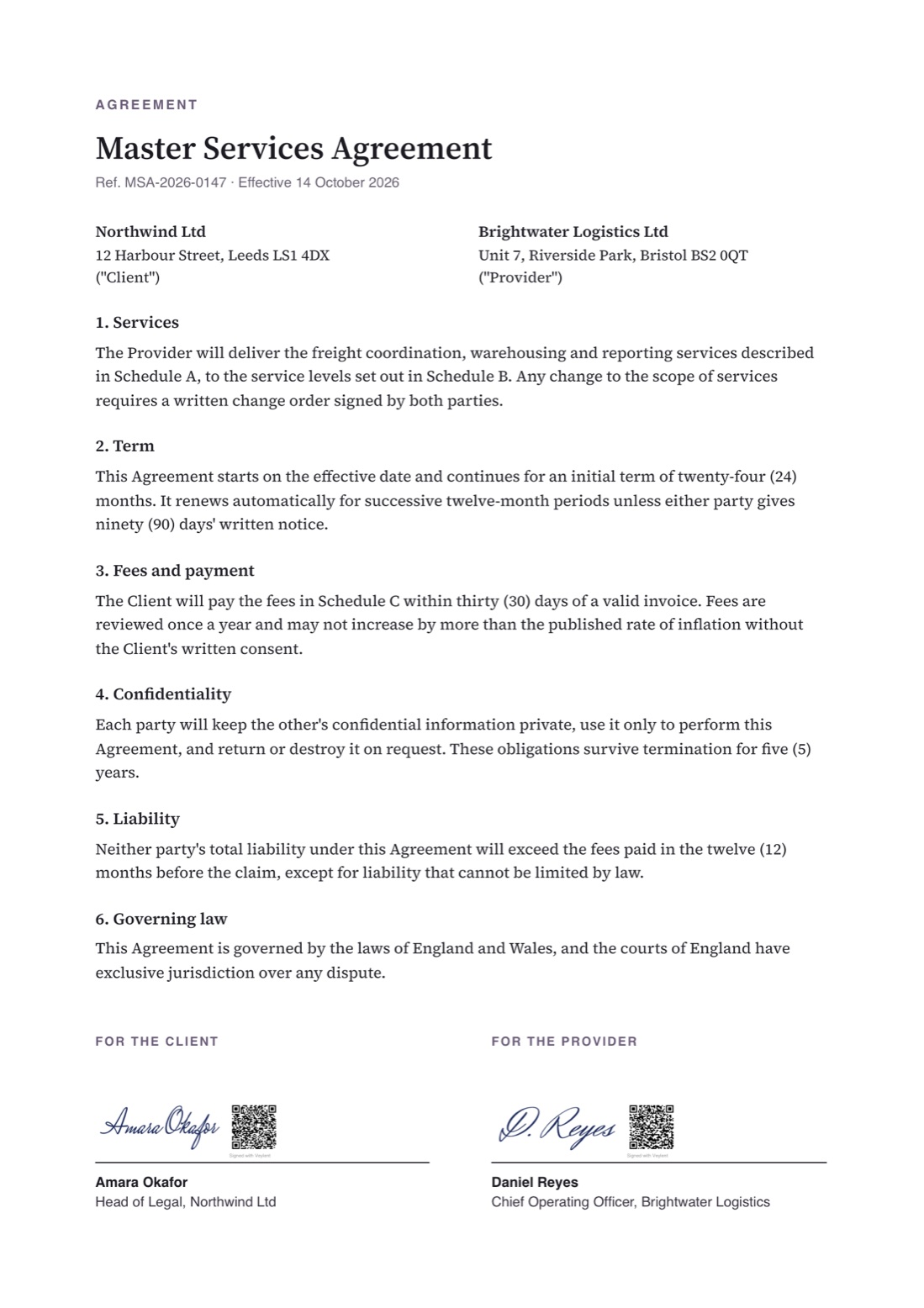
Veylent signs PDFs and anchors every signature on a public blockchain. Anyone can scan the QR code to see who signed and when, and the Veylent app confirms the file is exactly what was signed. And it runs entirely in your own infrastructure.
- Runs in your infrastructure
- No document content on chain
- Verify without an account
A signature is only as good as the proof behind it
Signed PDFs can be edited
A signature image on a page proves little. Without a record kept somewhere independent, a changed clause can look exactly like the original.
Proof depends on the vendor
With most e-signature services, checking a signature means trusting that service’s database, and that it will still exist when a dispute arises years later.
Sensitive documents leave your control
Contracts, records and personal data are uploaded to a third party’s cloud, which is hard to justify in regulated work.
How it works
Sign once. Prove it to anyone, for as long as the document exists.
- Step 1
Sign
People sign PDFs in the Veylent desktop app with a drawn, uploaded or typed signature. Several people can sign the same document in turn.
- Step 2
Anchor
Each signature records a fingerprint of the document on a public blockchain, with a timestamp. The document itself never leaves your organisation.
- Step 3
Verify
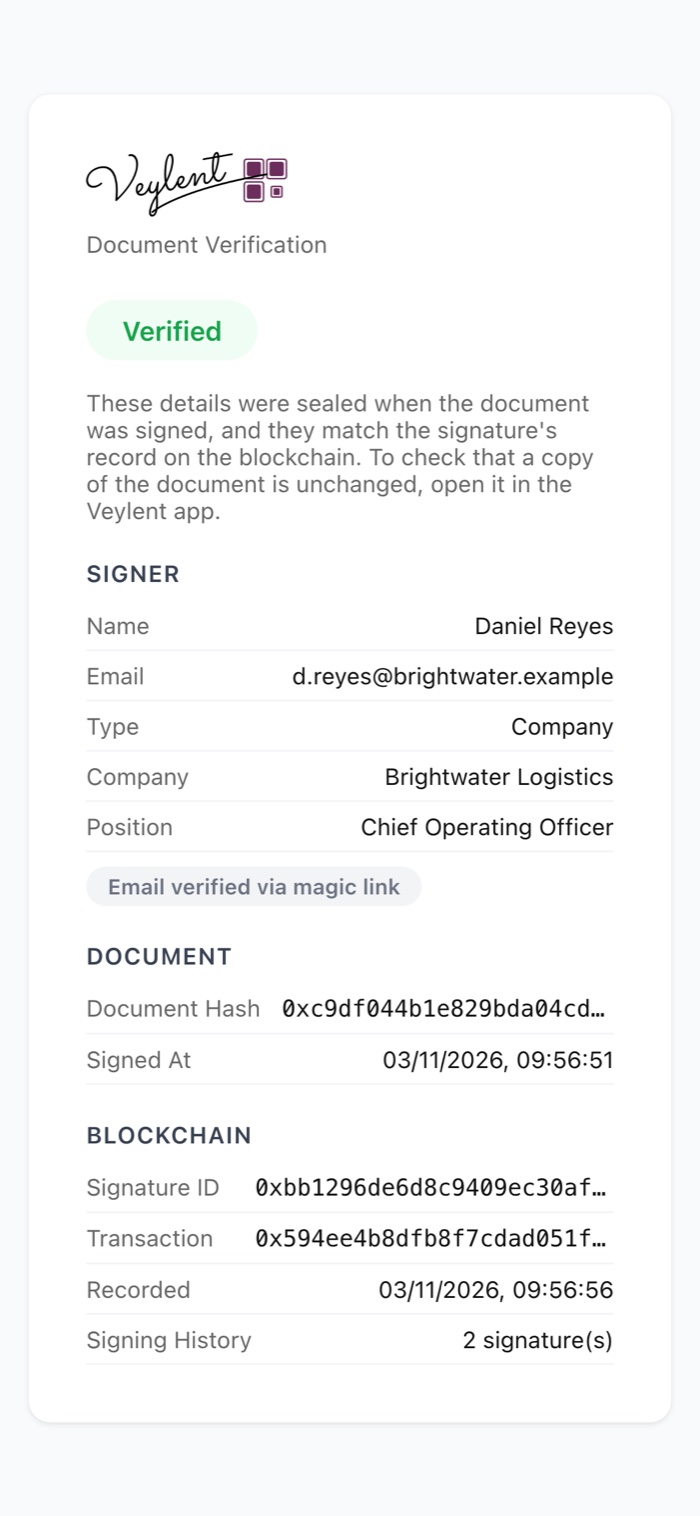
Scanning the QR code on the document shows who signed it and when, with no account or software. Opening the file in Veylent also confirms nothing has changed since.
Built for the people who have to stand behind a signature
Legal & compliance
Evidence that stands on its own.
- A timestamped record of every signature that no one can quietly alter, including you and us
- The complete signing history of a document, in order
- Changes after signing are detected, down to a single character
IT & security
Your infrastructure, your data.
- Runs as containers in your own environment, with your own database and mail server
- Signer details are encrypted; only a fingerprint goes on the blockchain
- Sign-in with email codes, Google or Microsoft, with rate limits built in
Operations
Fewer steps, fewer disputes.
- Sign in minutes, without printing, scanning or couriers
- Counterparties check who signed by scanning the QR code with their phone
- Saved signatures and text snippets follow people across devices
Privacy by design
Public proof, without publishing anything private
The blockchain holds a fingerprint, not the document. Who signed is encrypted, and the key to read it is printed only in the QR code on the document itself. So only someone who holds the document can see the signer’s details.
Security & trust in detailRecorded publicly
- A fingerprint of the signed document
- The time it was signed
- A link to the previous signature
Never published
- The document or any of its content
- Signer names, emails or positions
- Anything that identifies your organisation
Your environment
├─ Veylent server · your containers
├─ Database · your Postgres
├─ Email · your mail server
└─ Verification site · your domain
Public
└─ Blockchain · fingerprints and timestamps only
Deployed privately, operated by your team
Veylent’s server ships as standard containers that run on your own servers or private cloud. Accounts, saved signatures and signing records stay in your database. Your IT team controls access, backups and upgrades.
What a deployment involvesFor work where a signature has to hold up later
See Veylent with your own documents
A 30-minute walkthrough: signing, verification, and how a private deployment would fit your environment.